







About this postCo-edited with Claude (Anthropic).
Summary
- When you hand infrastructure work to an AI agent, shell and Python scripts keep piling up until no human can review them. I think that is the thing to avoid most in building and operating systems
- I wanted to reproduce the same build in another environment, so I tried Ansible, which I had once shelved because it felt hard to get into. What won me over was that the tooling for review and visualization was already there
- Ansible forces output into a “module + parameters” shape,
--check --diffshows the diff before anything runs, and idempotency makes reruns safe. That makes it easy to split the work as the AI writes, the human approves the diff- On top of that, the framework enforces the syntax, so you don’t have to read through piles of shell written in different styles. The mature community also makes knowledge easy to share and search
- The benefits vanish if the agent falls back to
shell/command. You need ansible-lint (profile: production) and Molecule’s idempotence test to stop that mechanically- In the sample GPU server build, Ansible owns the host (driver, Docker, Container Toolkit) and Docker owns the app, and the driver–CUDA version chain lives in one place in group_vars
- Visualization is what makes review work: grapher (structure),
ansible-inventory --graph(variables),--list-*(scope) and--check --diff(changes), generated in CI and attached to the MR
I wanted to reproduce the same system build, as-is, in another environment.
These days, ask Claude Code and you get a setup shell script or Python script in seconds. But keep doing that and files like setup.sh, setup_v2.sh and fix_config_final.sh start to pile up. Which ones ran, in what order, and how far? Will the next environment end up the same? AI-written scripts scattered around until no human can review them — I think that is exactly what to avoid when building and operating systems.
That is when Ansible came back to mind. I had shelved it before because it felt hard to get into, but trying it again, I found plenty of tooling built for review: dry-run diffs, dependency visualization and more. Looking at it on the assumption that an AI agent does the writing changed my opinion of it quite a bit.
I’ll keep the actual build private, but I used it to apply the same change to several local development environments. This post organizes what I looked into along the way. The GPU server build in the second half is a sample build to make the research concrete.
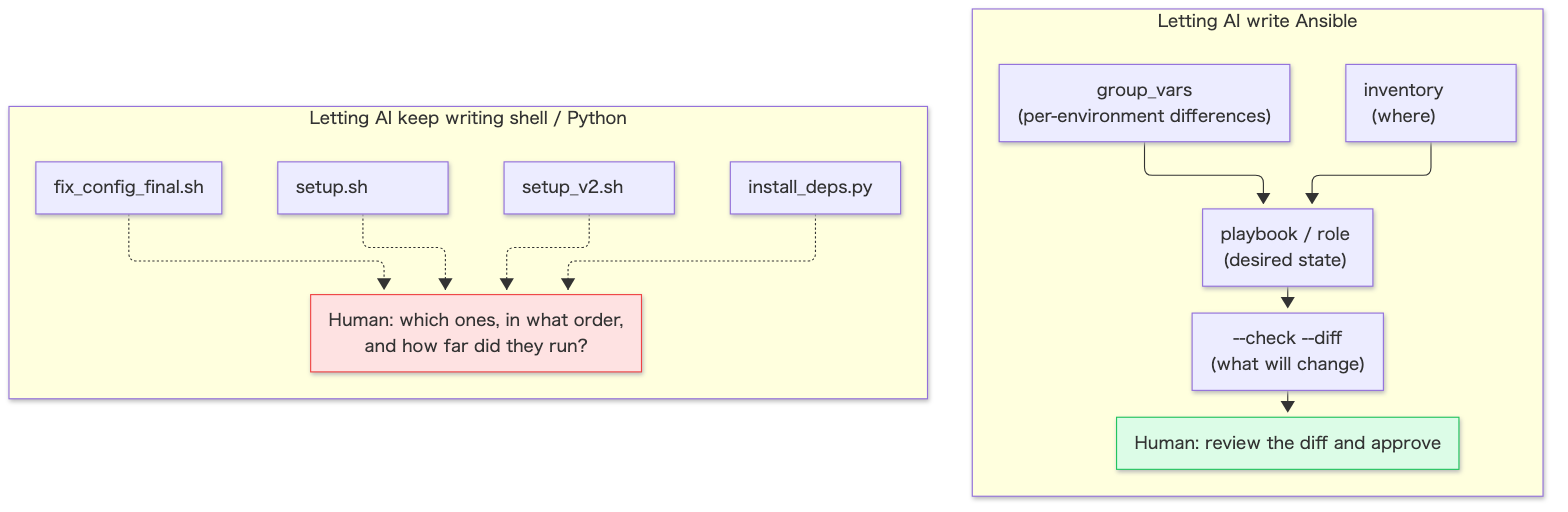
1. Why AI agents and Ansible work well together
Compared with having the agent write shell scripts:
| Aspect | Having it write shell scripts | Having it write Ansible |
|---|---|---|
| Output variance | The style changes every time | Constrained by a “module + parameters” DSL, so variance is small |
| Checking before running | Read it and guess | Preview changes with --check --diff1 |
| Recovering from failure | A human tracks how far it got | With idempotent modules, rerunning converges |
| Recording state | A script is a procedure; the desired state isn’t readable | inventory, group_vars and roles record the desired state |
| Automated checks | shellcheck, roughly | ansible-lint23 and Molecule45 |
| Consistent syntax | Every writer has their own style, so you have to read it all | The framework fixes the syntax, so you mainly check “which module got which values” |
| Sharing and searching knowledge | Everyone writes differently, so search results rarely match your case | Module names become a shared vocabulary, easy to look up in docs, Galaxy and the forum |
For an AI, the advantage is less “easier to write” and more easier to put through checks, approval and retries.
1.1 Check mode and diff mode
ansible-playbook site.yml --check --diff shows “what would change and how” without touching the remote hosts1. It drops straight into a flow where the diff of an agent-written playbook is attached to an MR and a human approves it before it is applied.
There are caveats1.
- Check mode is a simulation. Modules that don’t support check mode report nothing and do nothing
- Conditionals that depend on a previous task’s
registerresult won’t give meaningful results in check mode - Diff output can contain secrets. Add
diff: falseto those tasks
1.2 Idempotency holds per module
Ansible is idempotent because each module compares the current state with the desired state and only changes something when they differ. shell / command don’t do that comparison, so used naively they report changed every time and idempotency breaks.
In other words, an Ansible repo full of shell: is no better than a pile of shell scripts. That is why the guardrails in the next chapter are needed.
1.3 The framework enforces the syntax
Shell scripts can do the same thing in endless ways. Even installing a package splits into styles: apt-get install -y or apt install, check first with dpkg -s or not, set -e or not, how errors are handled. Have an agent write lots of them and you accumulate shell in many different styles, each of which a human has to read and verify.
In Ansible, the framework and modules decide “how to write it”.
- name: Install packages ansible.builtin.apt: name: [curl, gnupg2] state: presentWhat you check in review is mainly “which module got which values”. Whether the package is already installed, error handling and idempotency are handled by the module. Anything that strays from the conventions gets flagged mechanically by ansible-lint (section 2.1). You still need to read when conditions and templates, but the amount a human has to read drops a lot. In an era where agents write in bulk, that matters.
1.4 A mature community makes knowledge easy to share and search
- Module names become a shared vocabulary: you can state a problem precisely in terms of module and parameter names, like “
community.docker.docker_compose_v2withstate: restartedisn’t idempotent”. With shell, everyone writes differently, so searching rarely lands on information that matches your case - The information sources are well organized: the official docs list parameters, check mode support and examples for each module in the same format6. The collections bundled with the
ansiblepackage alone span many namespaces such as amazon, cisco, community and vmware7. Ansible Galaxy is the hub for sharing roles and collections8, and NVIDIA’s driver role mentioned in chapter 4 can be installed from Galaxy asnvidia.nvidia_driver9. For questions and discussion there is the Ansible Forum10 - Agents can use the same sources: something like
ansible-doc community.docker.docker_compose_v2pulls up a module’s docs on the control node. Having the agent run it before writing reduces parameter mistakes that come from relying on memory - Easier to share internally: because the style is consistent, you can read roles written by other teams
1.5 YAML vs HCL: syntax and units of abstraction
The benefit in section 1.3 applies to Terraform too. Both have the tool enforce the syntax and a fixed unit of abstraction. The difference is whether they sit on a general-purpose format or have a dedicated configuration language.
| Aspect | Ansible (YAML) | Terraform (HCL) |
|---|---|---|
| Syntax | YAML, a general-purpose data format | HCL, HashiCorp’s configuration language (Terraform’s language is based on it)11 |
| Formatting / checks | yamllint, ansible-lint | terraform fmt rewrites to the canonical format, and -check detects unformatted files12 |
| Unit of abstraction | role, collection | module (a set of resources managed together)13 |
| Previewing changes | --check --diff | terraform plan |
YAML’s strength is being a general-purpose format. You can parse it as-is with yq or Python, so tasks like “extract every place that uses shell: across all playbooks” or “list the driver branch in every group_vars file” need no special parser. It is just indentation and key–value pairs, so reviewers who don’t write Ansible can still follow what it does. It is also everywhere — CI configs, Compose and so on — so agents seem comfortable writing it (an impression, with no quantitative backing).
HCL’s strength is that the tool settles the format to exactly one12. Run terraform fmt -check in CI and cosmetic variance in agent-written code drops to zero mechanically. Modules also act as abstraction boundaries, with callers passing only input variables13. That makes it easy to constrain the agent to “only write code that calls already-reviewed modules”.
module "gpu_node" { source = "./modules/gpu_node" instance_type = "g6.xlarge" count = 2}YAML has a pitfall, though. In YAML 1.1, yes / no / on / off may be interpreted as booleans. yamllint’s truthy rule flags anything other than true / false by default14. Values you want treated as strings, like a driver branch number, are safer quoted as "580" (the examples in chapter 4 do this).
2. Guardrails for running agents
2.1 Stop “falling back to shell” with ansible-lint
When an agent doesn’t know the right module, it tends to reach for shell:. These ansible-lint rules catch it2.
| Rule | What it detects | Minimum profile that includes it3 |
|---|---|---|
command-instead-of-module | command used where a dedicated module exists | basic |
command-instead-of-shell | shell used where it isn’t needed | basic |
risky-shell-pipe | shell pipelines that can hide failures | safety |
no-changed-when | command / shell without changed_when (idempotency not declared) | shared |
Profiles get stricter in the order min → basic → moderate → safety → shared → production, and each includes the ones below it3. For agent-written code, set production (at least shared) and all four rules above apply.
profile: productionWhich profile a rule belongs to may change between versions. Check with ansible-lint --list-profiles when you set it up.
2.2 Test idempotency with Molecule
Molecule is a testing framework for roles, playbooks and collections, and it can target containers, VMs, network devices and more4. The default test sequence is below, with an idempotence step right after converge (apply)5.
dependency → cleanup → destroy → syntax → create → prepare→ converge → idempotence → side_effect → verify → cleanup → destroyThe idempotence step is generally used to confirm that “running it again reports no changes”. Run it in CI and humans no longer have to read the agent’s output line by line.
2.3 Set rules for where variables live
Ansible has 22 levels of variable precedence15. Even if the YAML itself is readable, tracing “where does this value ultimately come from” easily gets hard. Putting rules like these into the agent’s instructions (CLAUDE.md or AGENTS.md) keeps things reviewable.
- Put environment differences in
group_vars//host_vars/ - Put role defaults only in
defaults/main.yml - Don’t use
-e(extra vars, highest precedence15) except in emergencies - Don’t write complex conditionals in Jinja2 templates
2.4 Drift detection
Even with idempotency, manual changes go unnoticed until Ansible runs again. A common approach is to run --check --diff periodically and report any changed result as drift16. Going further, you could use Event-Driven Ansible (ansible-rulebook)17 to receive events and trigger a remediation playbook. That said, I couldn’t find an official guide specifically for this; it’s mostly demos and community examples.
2.5 Recommended flow
Putting it all together as one flow:
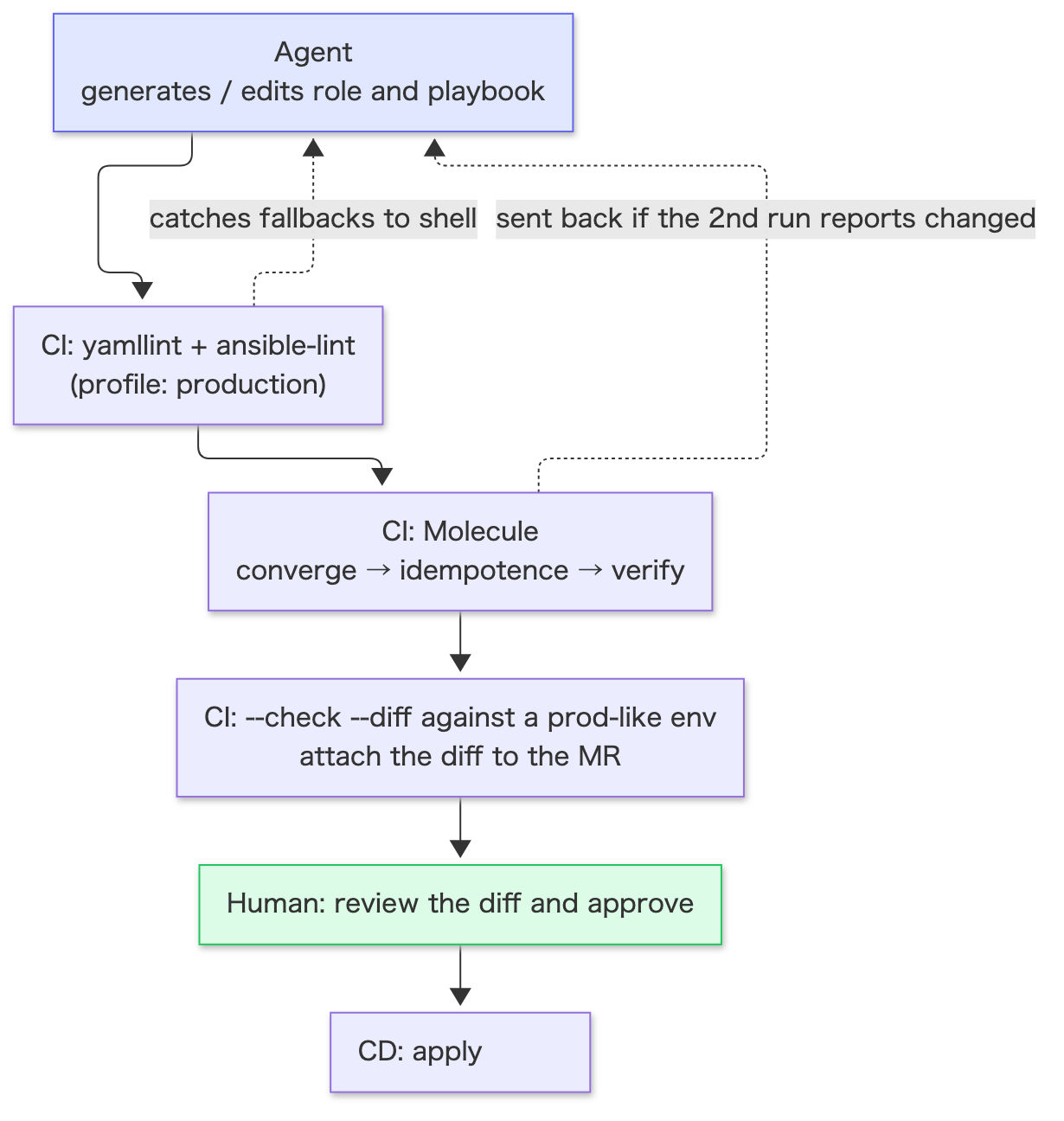
The agent’s job ends at “write”, and the human’s job is just “approve the diff”.
2.6 Mapping it onto Claude Code
If you work in Claude Code day to day, the guardrails above have natural homes.
| Guardrail | Where it lives in Claude Code |
|---|---|
Rules on where variables live, the “no shell:” policy | Write them in CLAUDE.md |
| Run ansible-lint every time | Use hooks to run ansible-lint automatically after YAML edits |
| A human approves anything applied to production | Configure permissions so running ansible-playbook requires confirmation |
| Review the diff before applying | Let the agent run up to --check --diff, and have a human read the raw output and decide |
The difference from having it write scripts is that what you inspect is no longer “code the agent wrote differently each time” but “YAML in a fixed shape, and its diff”.
3. Cloud vs on-prem
The commonly cited split is Terraform builds the boxes in the cloud, Ansible configures what’s inside them. Layers centered on creating and destroying things with state to manage — VPC, IAM, RDS — suit Terraform. Reviewing a terraform plan diff fits the same “agent writes, human approves the diff” flow as --check --diff.
On-prem, there are fewer cases of “create resources via an API” and more of configuring physical equipment that already exists. That is Ansible’s home turf, and one tool covers all of these layers.
| Layer | Main modules / collections | Purpose |
|---|---|---|
| Hardware (BMC) | community.general.redfish_command and friends18 | Power control, BMC user management, log management |
| Network devices | Each vendor’s network resource modules19 | VLAN / interface config, fetching current config |
| Virtualization | community.proxmox.proxmox_kvm20, VMware collections | Creating and configuring VMs |
| OS / middleware | ansible.builtin.*, various collections | Packages, config files, services, users |
There are things to watch when handing this to an agent.
- Network resource modules’
state: gatheredreturns the current config as structured data19. You can have the agent read the current state first and then draft changes from it - For
state: overridden, the official docs themselves warn that you may lose access to the device19. It’s safer to allow the agent onlymerged/replaced redfish_commanddoesn’t support check mode18. For destructive operations like power control, don’t let the agent run them; always put human approval in between
Terraform is usable on-prem too — there’s a provider for vSphere, for example21. But it doesn’t reach physical device configuration or the inside of the OS, so my personal take is that Ansible tends to be the main tool on-prem.
4. Sample build: standing up a service on a GPU server and handing it off
From here on is a sample to make the research concrete. The scenario: a developer builds a GPU server from a bare OS, runs an inference service in Docker, and finally hands it off to the infrastructure team.
The goal is to take the playbook that passed in the dev environment and run it in production by swapping only the inventory. The infrastructure team just executes a verified procedure, which removes misreadings of runbooks and copy mistakes.
4.1 Splitting responsibilities between Ansible and Docker
| Layer | Owner | Contents |
|---|---|---|
| Host | Ansible | NVIDIA driver, Docker Engine, NVIDIA Container Toolkit, users / directories, firewall |
| Deploy | Ansible | Placing compose.yaml / .env, docker compose up |
| App | Docker (image) | CUDA runtime, Python / libraries, inference code |
NVIDIA Container Toolkit assumes the driver is installed on the host22. So install the driver on the host only, and have the container carry just the CUDA user-space libraries.
The other principle is: don’t use Ansible inside a Dockerfile. Build the image contents with the Dockerfile and CI, and let Ansible handle only “which image to start, with which settings”. That keeps the boundary clear.
4.2 Driver and CUDA form a single chain
Even with containers, the host driver and the CUDA version inside the container stay linked. The minimum Linux driver versions required by NVIDIA’s minor version compatibility are23:
| CUDA in the container | Host driver |
|---|---|
| 12.x | 525 or later |
| 13.x | 580 or later |
On top of that, PyTorch’s pip wheels depend on the CUDA runtime, cuDNN, NCCL and so on as nvidia-* pip packages24. The CUDA user-space libraries come in as Python dependencies inside the container, and the host only needs the driver. So these four links form one chain:
Host driver (branch 580) └─ Supported CUDA range (up to 13.x) └─ torch CUDA variant and nvidia-* pip packages in the container └─ Inference speed / available kernels (cuDNN / NCCL versions)Developers are the ones deciding speed and library versions, so it makes sense for them to own the driver at the root of the chain too. On top of that, keep a task that checks the requirement is met after the driver is installed. Even if someone changes the driver by hand, deployment stops before anything breaks.
gpu_driver_branch: "580"gpu_min_driver_major: 580 # when using CUDA 13.x images
# roles/gpu_host/tasks/check_driver.yml- name: Get driver version ansible.builtin.command: nvidia-smi --query-gpu=driver_version --format=csv,noheader register: gpu_driver changed_when: false
- name: Assert driver meets CUDA requirement ansible.builtin.assert: that: - (gpu_driver.stdout_lines[0].split('.')[0] | int) >= gpu_min_driver_major fail_msg: "Driver {{ gpu_driver.stdout_lines[0] }} < {{ gpu_min_driver_major }}"It uses command, but changed_when: false declares it a read that doesn’t change state, so it doesn’t trip no-changed-when.
4.3 Choosing and pinning a driver branch
NVIDIA’s data center drivers come in three kinds of branches25.
| Branch | Support period | Use |
|---|---|---|
| New Feature Branch (NFB) | None | For evaluating new features. Not for production |
| Production Branch (PB) | Up to 1 year | Production |
| Long-Term Support Branch (LTSB) | 3 years | Production you don’t want to update for a long time |
For production, pick PB or LTSB and pin per branch. On Ubuntu, NVIDIA recommends installing its pinning package (e.g. nvidia-driver-pinning-580) before the driver26. This keeps an unintended apt upgrade from switching branches. Install the open kernel modules (the nvidia-open package)27.
# roles/gpu_host/tasks/driver.yml (adding the CUDA apt repository is omitted)- name: Pin driver branch ansible.builtin.apt: name: "nvidia-driver-pinning-{{ gpu_driver_branch }}" state: present
- name: Install NVIDIA driver (open kernel modules) ansible.builtin.apt: name: nvidia-open state: present register: driver_install
- name: Reboot if driver changed ansible.builtin.reboot: when: driver_install is changedOne constraint on Ubuntu: branches up to 580 have the branch number in the package name, and switching branches via upgrade / downgrade is supported only from 590 onward26. As an alternative there’s NVIDIA’s official role (nvidia.nvidia_driver); because it reboots the node during installation, running it from a node other than the GPU node is recommended9. With ansible.builtin.reboot, you can handle reboots including waiting for the host to come back28.
4.4 Rolling updates (a design proposal)
Driver updates need a reboot, which stops the service. With multiple machines, use serial to go one at a time29. The following is a design proposal combining official features; it hasn’t been verified on real hardware.
- name: Rolling driver update hosts: gpu_servers serial: 1 # one at a time; can also be staged like [1, "50%"] tasks: - name: Stop service community.docker.docker_compose_v2: project_src: /opt/inference state: stopped - name: Update driver via gpu_host role ansible.builtin.import_role: name: gpu_host # switch pinning → update driver → reboot → assert - name: Smoke test (GPU visible from container) ansible.builtin.command: docker run --rm --gpus all ubuntu nvidia-smi changed_when: false - name: Start service community.docker.docker_compose_v2: project_src: /opt/inference state: presentIf the smoke test fails on the first machine, it doesn’t move on to the rest. This extends “just run the verified procedure” to updates as well.
Also, the driver’s kernel modules work in tandem with the running kernel. As general operational knowledge, there are known cases where the module fails to load after an automatic kernel update and the GPU disappears, so it’s safer to handle kernel updates in the same playbook as driver updates rather than leaving them entirely to unattended-upgrades (the behavior differs between DKMS and prebuilt modules).
4.5 Container runtime and deployment
NVIDIA Container Toolkit’s official procedure is: add the apt repository → install the packages → nvidia-ctk runtime configure --runtime=docker → restart Docker22.
nvidia-ctk runtime configure is a command that rewrites /etc/docker/daemon.json22. Calling it as-is via command breaks idempotency and gets flagged by ansible-lint. Instead, manage an equivalent daemon.json as a template, which makes it reviewable as a diff and idempotent. The generated content can vary by version, so the reliable way is to run nvidia-ctk once on real hardware and copy its output into the template.
- name: Install NVIDIA Container Toolkit (version pinned) ansible.builtin.apt: name: - "nvidia-container-toolkit={{ nvidia_ctk_version }}" - "nvidia-container-toolkit-base={{ nvidia_ctk_version }}" - "libnvidia-container-tools={{ nvidia_ctk_version }}" - "libnvidia-container1={{ nvidia_ctk_version }}" state: present notify: Restart docker
- name: Configure Docker daemon (nvidia runtime) ansible.builtin.template: src: daemon.json.j2 dest: /etc/docker/daemon.json mode: "0644" notify: Restart dockerGPUs in compose.yaml are specified with deploy.resources.reservations.devices. capabilities is required, and count and device_ids can’t be set together30.
services: inference: image: registry.example.com/team/inference@sha256:... # pinned by digest deploy: resources: reservations: devices: - driver: nvidia device_ids: ["0"] capabilities: [gpu]From Ansible, start it with community.docker.docker_compose_v2. This module supports check mode. However, state: restarted and recreate: always aren’t idempotent, so don’t use them for normal deployments6. Finally, add a smoke test equivalent to the official sample workload31 with changed_when: false, and every production run confirms that “the GPU is visible from the container”.
4.6 What gets handed off
gpu-service-deploy/├── roles/│ ├── gpu_host/ # driver install / pin / check, Docker, Container Toolkit│ └── app_deploy/ # place compose.yaml / .env and start├── inventories/│ ├── dev/ # managed and verified by developers│ └── prod/ # filled in by infra (hostnames, Vault)├── group_vars/│ └── gpu_servers.yml # driver branch and image digest managed together├── site.yml # initial build from a bare OS├── driver_update.yml # rolling driver updates├── molecule/ # OS-layer tests└── README.md # prerequisites, variable list, commands| Item | Developers | Infrastructure |
|---|---|---|
| roles, playbooks, compose.yaml | Write and verify | Review |
| Driver branch choice, update timing | Decide, verify in dev | Schedule the update |
inventories/prod, Vault | Provide the variable skeleton | Fill in and manage values |
| Production run | — | Check --check --diff, then run |
What matters most in the handoff is pinning versions. List the driver branch, Container Toolkit version and image digest in group_vars, and make it a rule to change them together in the same MR. That makes it much easier to guarantee that “the same thing that passed in dev” runs in production.
Testing has limits too. Molecule’s containers have no GPU, so test the OS layer with Molecule and use a development GPU server as the real-hardware test environment for the GPU layer. What’s easy to hand to an agent is writing roles and the “run → fix” loop on the dev server; production runs happen only after a human has looked at the diff.
5. Visualizing dependencies
What I liked when trying Ansible was that this visualization tooling is already there. When reviewing an agent-written playbook, reading YAML one file at a time makes it hard to grasp “which role is called in what order, and which hosts it hits”. Combine these four views.
| What you want to see | Tool | Output |
|---|---|---|
| Structure of playbook → play → role → task | ansible-playbook-grapher32 | SVG / Mermaid / JSON |
| Which host belongs to which group, with which variables | ansible-inventory --graph --vars33 | Text tree |
| List of tasks, tags and hosts that will run | ansible-playbook --list-tasks etc.34 | Text |
| History of actual run results | ARA Records Ansible35 | Web UI / CLI / REST API |
5.1 Playbook structure: ansible-playbook-grapher
A tool that statically analyzes a playbook and graphs the relationships between plays, roles and tasks. It doesn’t run anything against the inventory32.
pip install ansible-playbook-grapher
# Output SVG including tasks inside roles (requires Graphviz)ansible-playbook-grapher --include-role-tasks --show-handlers site.yml -o docs/site
# Output Mermaid (embeddable in Markdown)ansible-playbook-grapher --include-role-tasks --renderer mermaid-flowchart site.yml -o docs/site| Option | What it does |
|---|---|
--include-role-tasks | Include tasks inside roles in the graph |
--renderer | graphviz (default, SVG) / mermaid-flowchart / json |
--show-handlers | Show handlers too |
-t / --skip-tags | Filter by tags |
--group-roles-by-name | Merge roles with the same name into one node |
For the chapter 4 sample (site.yml), the graph looks roughly like this.
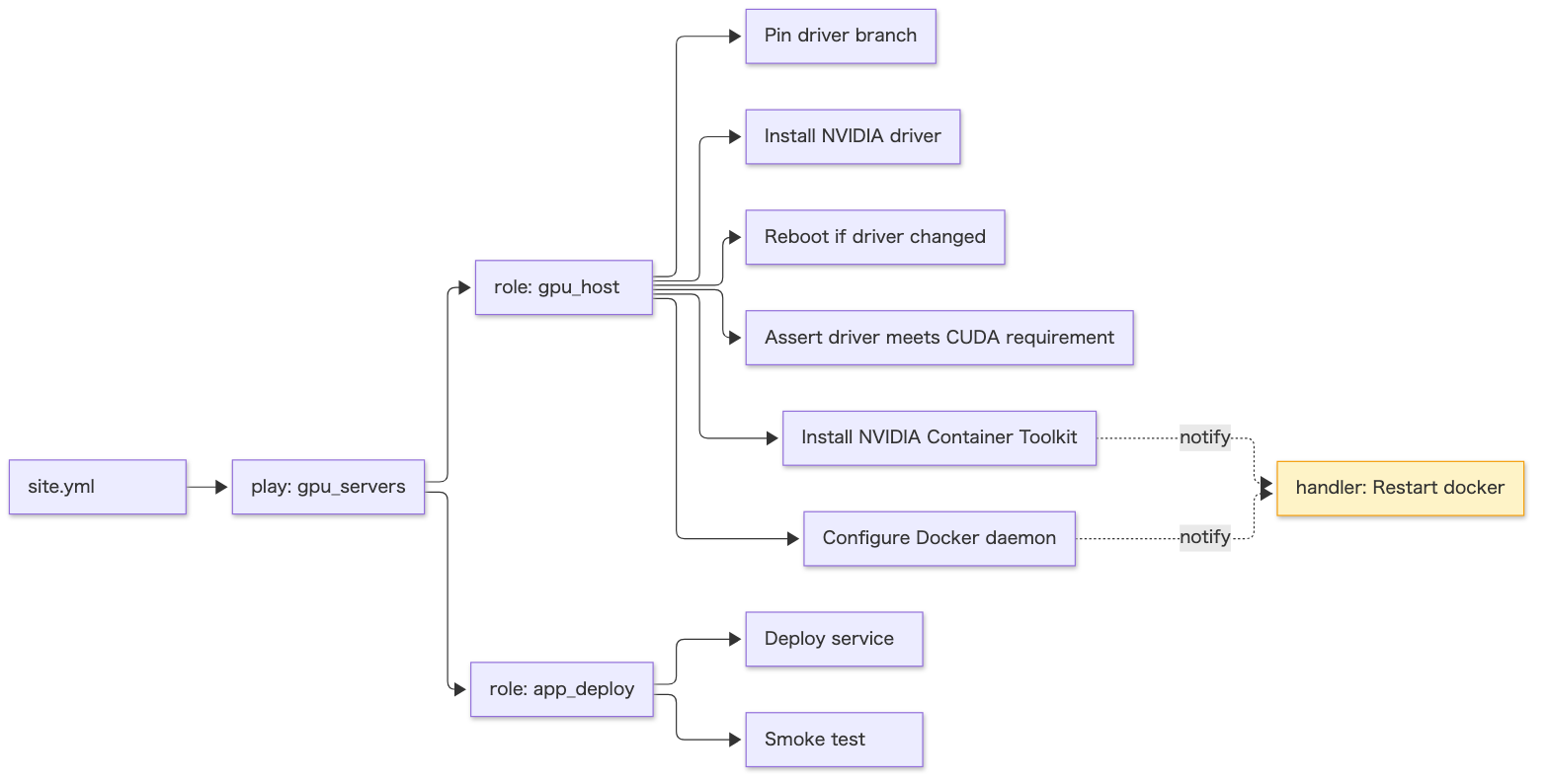
NOTEThis diagram is a hand-drawn illustration of the output; grapher’s actual output differs in node shapes and labels.
Two ways it pays off in review:
- Generate Mermaid in CI and attach it to the MR: when the agent adds a role or reorders tasks, the structural change shows up as a diff of the diagram. Ordering mistakes like “the Container Toolkit install comes before the driver check” become easy to spot
- Check where handlers are notified from: with
--show-handlersyou can see which task calls which handler, and confirmRestart dockerisn’t being triggered by unexpected tasks
5.2 Inventory structure: ansible-inventory —graph
ansible-inventory -i inventories/prod --graph --vars--graph prints the tree of groups and hosts, and adding --vars also shows each host’s and group’s variables (--vars only takes effect together with --graph)33. The output looks roughly like this (hostnames are examples).
@all: |--@ungrouped: |--@gpu_servers: | |--gpu01 | | |--{gpu_driver_branch = 580} | | |--{gpu_min_driver_major = 580} | |--gpu02 | | |--{gpu_driver_branch = 580} | | |--{gpu_min_driver_major = 580}This addresses the “22 levels of variable precedence are hard to trace” problem from section 2.3. You can check the final values after group_vars and host_vars are merged, per host. Run it after the infrastructure team fills in inventories/prod, and missing entries or mismatched values show up in one list.
5.3 Execution plan: ansible-playbook —list-*
ansible-playbook -i inventories/prod driver_update.yml --list-hosts # target hostsansible-playbook -i inventories/prod driver_update.yml --list-tasks # tasks that will runansible-playbook -i inventories/prod driver_update.yml --list-tags # available tagsNone of these run anything34. Where --check --diff shows “what will change”, these show “what will run, against which hosts”.
5.4 Run history: ARA Records Ansible
ARA runs as an Ansible callback plugin and records ansible-playbook results (per play, task and host). By default it stores them in a local SQLite database, viewable through a Web UI, CLI and REST API35.
pip install "ara[server]"export ANSIBLE_CALLBACK_PLUGINS="$(python3 -m ara.setup.callback_plugins)"ansible-playbook -i inventories/dev site.ymlara-manage runserver # http://127.0.0.1:8000How the callback is configured may change between versions, so check the official docs when setting it up. It helps for work where you later want to trace “when, on which host, what changed”. It also lets a human review, after the fact, the history of runs an agent repeated in the dev environment.
5.5 Fitting it into the review flow
Adding visualization to the flow from section 2.5 gives this.
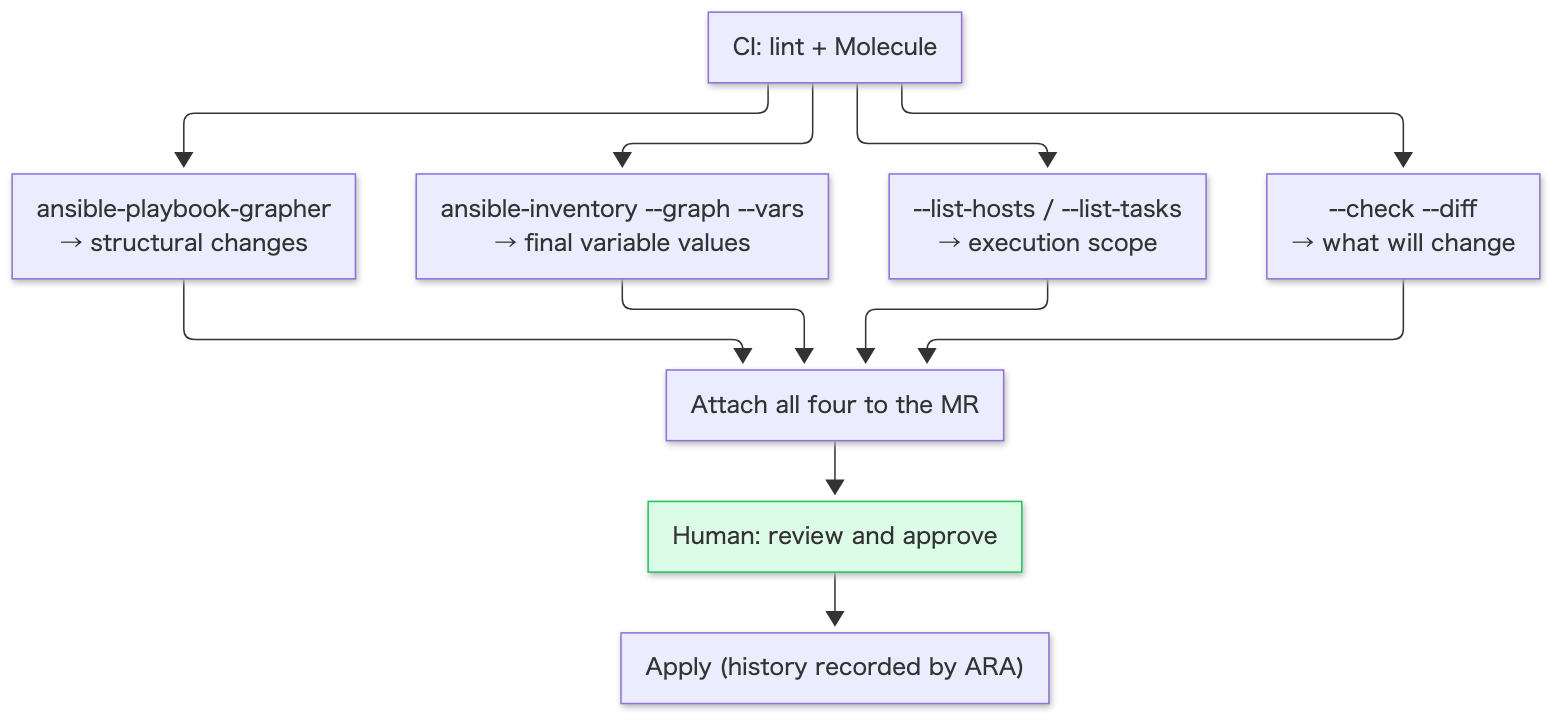
With structure, values, scope and changes laid out as diagrams and text, you can decide without mentally executing the AI-written YAML. That is the big difference from reading scattered scripts.
Wrap-up
| Environment | Recommended setup | How the agent is involved |
|---|---|---|
| Cloud | Terraform (boxes) + Ansible (contents) | A human approves the plan and --check --diff diffs |
| On-prem | Ansible as the main tool (BMC, network, virtualization, OS) | Grasp current state with gathered → draft changes → approve the diff. Humans run destructive operations like power control |
| GPU server + Docker (sample) | Ansible (host, deploy) + Docker (app) | Iterate in dev → swap the inventory and hand off to production |
| Common | ansible-lint (production) + Molecule (idempotence) | Nothing that fails lint or tests gets merged |
| Visualization | grapher (structure) + inventory —graph (variables) + —list-* (scope) + ARA (history) | Generate in CI and attach to the MR as review material |
Thanks to AI agents, the cost of writing build procedures has dropped to almost zero. In exchange, keeping what gets written in a form humans can review has become more valuable. Rather than letting an AI keep writing shell and Python scripts, leaning on a framework with a fixed output shape that shows you diffs and structure makes builds easier to reproduce. I think Ansible may well be a good choice for that framework.
References
- Ansible Documentation - Validating tasks: check mode and diff mode https://docs.ansible.com/ansible/latest/playbook_guide/playbooks_checkmode.html
- Ansible Lint Documentation - Rules https://docs.ansible.com/projects/lint/rules/
- Ansible Lint Documentation - Profiles https://docs.ansible.com/projects/lint/profiles/
- Molecule Documentation https://docs.ansible.com/projects/molecule/
- Molecule Documentation - Configuration (test_sequence) https://docs.ansible.com/projects/molecule/configuration/
- community.docker.docker_compose_v2 module https://docs.ansible.com/ansible/latest/collections/community/docker/docker_compose_v2_module.html
- Ansible Documentation - Collection Index https://docs.ansible.com/ansible/latest/collections/index.html
- Ansible Galaxy https://galaxy.ansible.com/
- NVIDIA/ansible-role-nvidia-driver https://github.com/NVIDIA/ansible-role-nvidia-driver
- Ansible Community Forum https://forum.ansible.com/
- Terraform Documentation - Configuration Syntax https://developer.hashicorp.com/terraform/language/syntax/configuration
- Terraform CLI - terraform fmt https://developer.hashicorp.com/terraform/cli/commands/fmt
- Terraform Documentation - Modules https://developer.hashicorp.com/terraform/language/modules
- yamllint - Rules (truthy) https://yamllint.readthedocs.io/en/stable/rules.html
- Ansible Documentation - Using variables (Variable precedence) https://docs.ansible.com/ansible/latest/playbook_guide/playbooks_variables.html
- Spacelift - Ansible configuration drift management https://spacelift.io/blog/ansible-configuration-drift-management
- Ansible Rulebook Documentation - Getting started https://docs.ansible.com/projects/rulebook/en/v1.2.0/getting_started.html
- community.general.redfish_command module https://docs.ansible.com/ansible/latest/collections/community/general/redfish_command_module.html
- Ansible Documentation - Network Resource Modules https://docs.ansible.com/ansible/latest/network/user_guide/network_resource_modules.html
- community.proxmox collection https://docs.ansible.com/ansible/latest/collections/community/proxmox/index.html
- Terraform Provider for VMware vSphere https://github.com/vmware/terraform-provider-vsphere
- NVIDIA Container Toolkit - Installation Guide https://docs.nvidia.com/datacenter/cloud-native/container-toolkit/latest/install-guide.html
- NVIDIA CUDA Toolkit Release Notes (minor version compatibility) https://docs.nvidia.com/cuda/cuda-toolkit-release-notes/index.html
- PyTorch Forums - Where and how do pip installs of Pytorch install CUDA https://discuss.pytorch.org/t/where-and-how-do-pip-installs-of-pytorch-install-cuda/129760
- NVIDIA Data Center Drivers - Driver Lifecycle https://docs.nvidia.com/datacenter/tesla/drivers/driver-lifecycle.html
- NVIDIA Driver Installation Guide - Version locking https://docs.nvidia.com/datacenter/tesla/driver-installation-guide/version-locking.html
- NVIDIA Driver Installation Guide - Kernel Modules https://docs.nvidia.com/datacenter/tesla/driver-installation-guide/kernel-modules.html
- ansible.builtin.reboot module https://docs.ansible.com/ansible/latest/collections/ansible/builtin/reboot_module.html
- Ansible Documentation - Controlling playbook execution: strategies and more (serial) https://docs.ansible.com/ansible/latest/playbook_guide/playbooks_strategies.html
- Docker Docs - Enable GPU support (Compose) https://docs.docker.com/compose/how-tos/gpu-support/
- NVIDIA Container Toolkit - Running a Sample Workload https://docs.nvidia.com/datacenter/cloud-native/container-toolkit/latest/sample-workload.html
- ansible-playbook-grapher https://github.com/haidaraM/ansible-playbook-grapher
- Ansible Documentation - ansible-inventory https://docs.ansible.com/ansible/latest/cli/ansible-inventory.html
- Ansible Documentation - ansible-playbook https://docs.ansible.com/ansible/latest/cli/ansible-playbook.html
- ARA Records Ansible https://ara.recordsansible.org/